Webflow vs. Carrd vs. WordPress: Which Is Best for a Microsite?
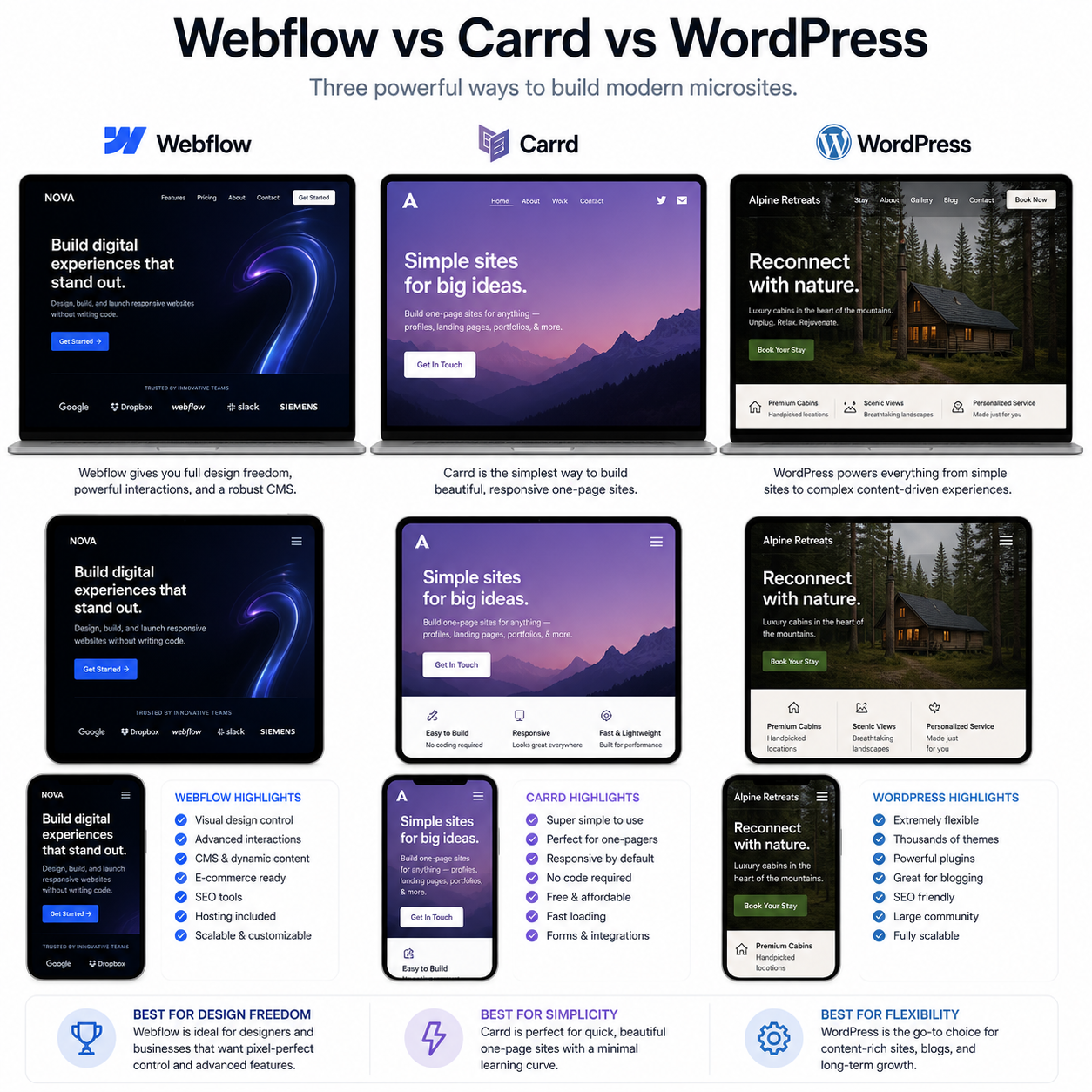
A microsite is a focused website built for one campaign, event, product, portfolio, or small branded project. Choosing the right builder affects more than appearance: it determines how quickly you can launch, how much design control you have, how microsite hosting works, and how much maintenance the project will need.
Webflow, Carrd, and WordPress can all support a professional microsite, but they suit different priorities. Carrd favors speed and simplicity, Webflow offers detailed visual control, and WordPress provides the broadest extension path. The right choice depends on the site’s purpose today and the changes you may need tomorrow.
What to Look for in a Microsite Builder
A microsite builder should match your required speed, control, and maintenance capacity. Evaluate setup time, hosting, design flexibility, content management, custom domain support, responsive design, and the likelihood that the project will expand.
Start with the job the microsite must perform. A single landing page for a short campaign has different requirements from an event hub with schedules, speaker profiles, registration content, and frequent updates.
- Setup: Can you publish without coding, server configuration, or specialist help?
- Design control: Do templates provide enough flexibility for the brand, or do you need precise layout and interaction control?
- Hosting: Is hosting included, or must you select and manage a separate provider?
- Content management: Will one person edit a few sections, or will several contributors manage structured content?
- Maintenance: Who handles updates, backups, security, forms, integrations, and software compatibility?
- Growth: Could the microsite become a larger website, resource center, or ongoing content operation?
A useful decision rule is the three-horizon test: choose for the launch deadline, the expected workload during the first year, and the most realistic growth scenario. Overbuilding wastes time and budget; underbuilding can force an expensive migration later.
Webflow for Microsites
Webflow is well suited to branded microsites that need high visual control, responsive design, and managed hosting. It gives designers a visual development environment without requiring them to hand-code every layout, while still exposing detailed control over structure, typography, spacing, and interactions.
Webflow works particularly well for campaign sites, product launches, creative portfolios, and polished event experiences. Its visual canvas supports custom layouts beyond what a basic template normally allows. Designers can establish reusable classes, responsive breakpoints, animations, forms, and content structures through the platform.
Webflow hosting is handled through Webflow’s hosting plans rather than a separately configured server. That reduces infrastructure work: the site owner does not normally need to install updates, maintain a hosting control panel, or manage a conventional WordPress security stack. A custom domain can be connected when the selected plan supports it.
The compromise is complexity. Webflow is easier than building a microsite entirely from code, but it has a steeper learning curve than Carrd. Its interface rewards users who understand layout systems, CSS concepts, breakpoints, and component-style design. Costs can also rise when a project needs additional content management or collaboration features, so confirm current plan details before committing.
Webflow is a strong fit when visual identity matters more than the absolute fastest setup and when the team wants managed microsite hosting with room for sophisticated presentation.
Carrd for Microsites
Carrd is the simplest option for a fast, lightweight, one-page microsite. It is designed for landing pages, personal profiles, event announcements, small portfolios, link pages, and focused campaign sites that do not require a complex content management system.
Its main advantage is a short path from blank page to published page. Carrd’s templates provide a practical starting point, while its editor supports custom colors, typography, sections, columns, buttons, images, forms, and embedded content. Someone with limited technical experience can usually understand the core workflow quickly.
Carrd can support a custom domain on eligible plans, and its hosting model is considerably simpler than managing self-hosted software. That makes it attractive when the goal is to publish one reliable page without maintaining plugins, themes, databases, or server packages.
The limitation is scope. Carrd is intentionally focused on compact sites, so it becomes less suitable when the project needs many pages, advanced content relationships, frequent publishing, complex navigation, or a large editorial workflow. You can create a visually effective microsite, but you are working within a more constrained layout and feature model than Webflow or WordPress.
Choose Carrd when **launch speed and low maintenance** matter most. For a temporary campaign or simple branded landing page, its restraint is an advantage rather than a weakness. A project expected to become a substantial website may outgrow it.
WordPress for Microsites
WordPress is the most flexible choice when a microsite needs extensibility, structured content, or a clear path to expansion. As a content management system, it supports themes, plugins, custom fields, forms, analytics, memberships, and many other integrations.
WordPress can power a single campaign page just as it can support a larger publishing site. Themes and page builders make visual editing accessible, while custom development allows a team to create a highly tailored experience. That range makes WordPress useful for event microsites with multiple content types, educational projects, directories, and branded sites that may later merge into a main domain.
Unlike hosted Webflow or Carrd plans, self-hosted WordPress generally requires separate microsite hosting. The owner must choose a hosting provider, connect the custom domain, configure SSL, and maintain the installation. Managed WordPress hosting can reduce this workload, but responsibility still exists for theme and plugin choices, updates, backups, permissions, and security review.
WordPress’s flexibility carries an operational cost. A small site with several plugins may become harder to troubleshoot than a simpler hosted builder. Poorly maintained software can also create security and performance problems. Keep the stack lean, update components regularly, and test changes before publishing.
WordPress is the best strategic choice when the microsite has a **content-heavy workflow or credible expansion plan**. It is often unnecessary for a one-page page that will remain unchanged for three months.
Webflow vs. Carrd vs. WordPress: Key Differences
The main difference is the balance each platform strikes between simplicity, design control, and extensibility. Carrd minimizes setup and maintenance, Webflow maximizes visual control within managed hosting, and WordPress offers the broadest ecosystem at the cost of greater responsibility.
| Criteria | Webflow | Carrd | WordPress |
|---|---|---|---|
| Ease of use | Moderate learning curve | Very beginner-friendly | Varies by theme and plugins |
| Design control | High | Moderate within a focused editor | Moderate to very high |
| Best format | Polished multi-section or small multi-page microsites | One-page microsites | Content-rich or expandable projects |
| Hosting | Platform-managed hosting plan | Platform-managed hosting plan | Usually separate hosting, unless managed hosting is used |
| Maintenance | Low to moderate | Low | Moderate to high |
| Scalability | Good for design-led growth | Limited beyond compact sites | Very high |
For a fast campaign page, Carrd usually wins on efficiency. For a distinctive launch experience with custom interactions, Webflow gives designers more room. For a microsite that may become a long-term content property, WordPress offers the strongest foundation, provided someone accepts the maintenance work.
Which Microsite Builder Should You Choose?
Choose Carrd for a simple one-page site, Webflow for a highly branded visual experience, and WordPress for structured content or significant future growth. The best microsite builder is the one whose limits align with the project rather than the one with the longest feature list.
Choose Carrd when speed comes first
Use Carrd for a temporary promotion, personal landing page, RSVP page, link hub, or compact portfolio. It is particularly suitable when one person owns the content and the page will receive occasional updates.
Choose Webflow when brand presentation leads
Use Webflow when typography, spacing, animation, responsive behavior, and visual storytelling need close attention. It suits agencies, designers, startups, and marketing teams that want managed hosting without sacrificing a refined interface.
Choose WordPress when the project may grow
Use WordPress when you expect multiple pages, recurring publishing, contributors, integrations, or a later transition into a broader website. Budget for hosting, maintenance, backups, and technical oversight from the beginning.
Budget should include more than the subscription or hosting fee. Consider design labor, domain registration, premium templates, form tools, analytics, migration risk, and the cost of fixing a platform that no longer fits. The cheapest launch can become the most expensive option if the microsite must be rebuilt under deadline.
Microsite Hosting and Launch Checklist
A successful microsite launch requires a suitable custom domain, reliable hosting, responsive testing, performance checks, and a simple update plan. Hosting decisions should be made before design work is complete because they affect publishing, forms, security, and ownership.
- Define ownership: Register the custom domain and platform account under the organization’s email, not a temporary contractor account.
- Select the hosting model: Confirm whether Webflow or Carrd hosting meets the project needs, or choose managed or self-hosted WordPress hosting.
- Build for responsive design: Test navigation, typography, forms, images, and spacing on current desktop and mobile screen sizes.
- Check the domain and SSL: Verify DNS records, HTTPS, redirects, canonical settings, and the preferred www or non-www version.
- Test the conversion path: Submit every form, inspect confirmation messages, test email delivery, and verify analytics events.
- Review performance: Compress images, remove unnecessary scripts, limit animation on mobile, and test the published URL rather than only the editor preview.
- Plan updates: Record who changes event dates, campaign copy, links, legal notices, and contact details after launch.
Common mistakes include choosing WordPress for a page that needs no content system, selecting Carrd for a project already known to need many pages, and treating hosting as an afterthought. Another frequent error is testing only on the creator’s device. A microsite is part of a user journey, so its domain, loading experience, accessibility, and form behavior deserve the same attention as its visual design.
Frequently Asked Questions
Is Carrd suitable for a professional microsite?
Yes. Carrd can produce a professional microsite when the content is focused and the design fits its one-page model. Strong branding, concise copy, optimized images, a custom domain, and a reliable contact or signup flow matter more than platform complexity.
Does Webflow include microsite hosting?
Webflow provides platform-managed hosting through its applicable hosting plans. Review current plan limits, domain support, CMS needs, forms, and publishing requirements before purchase because features and pricing can change.
Does WordPress require separate hosting?
Self-hosted WordPress generally requires separate web hosting, a domain, SSL, and ongoing maintenance. Managed WordPress hosting bundles some operational services, but the site owner remains responsible for software choices and content administration.
Which platform is easiest for beginners?
Carrd is usually the easiest for beginners because its editor and one-page structure reduce decisions. Webflow is approachable after learning its layout concepts, while WordPress can be simple for basic use but more demanding once themes and plugins are added.
Which builder is best for a microsite that may expand?
WordPress generally offers the greatest expansion potential, followed by Webflow for design-led growth. Carrd is best when the project is expected to remain compact. Decide based on the type of growth: structured publishing favors WordPress, while visual sophistication favors Webflow.