Improving Microsite SEO: Technical Considerations and Strategies
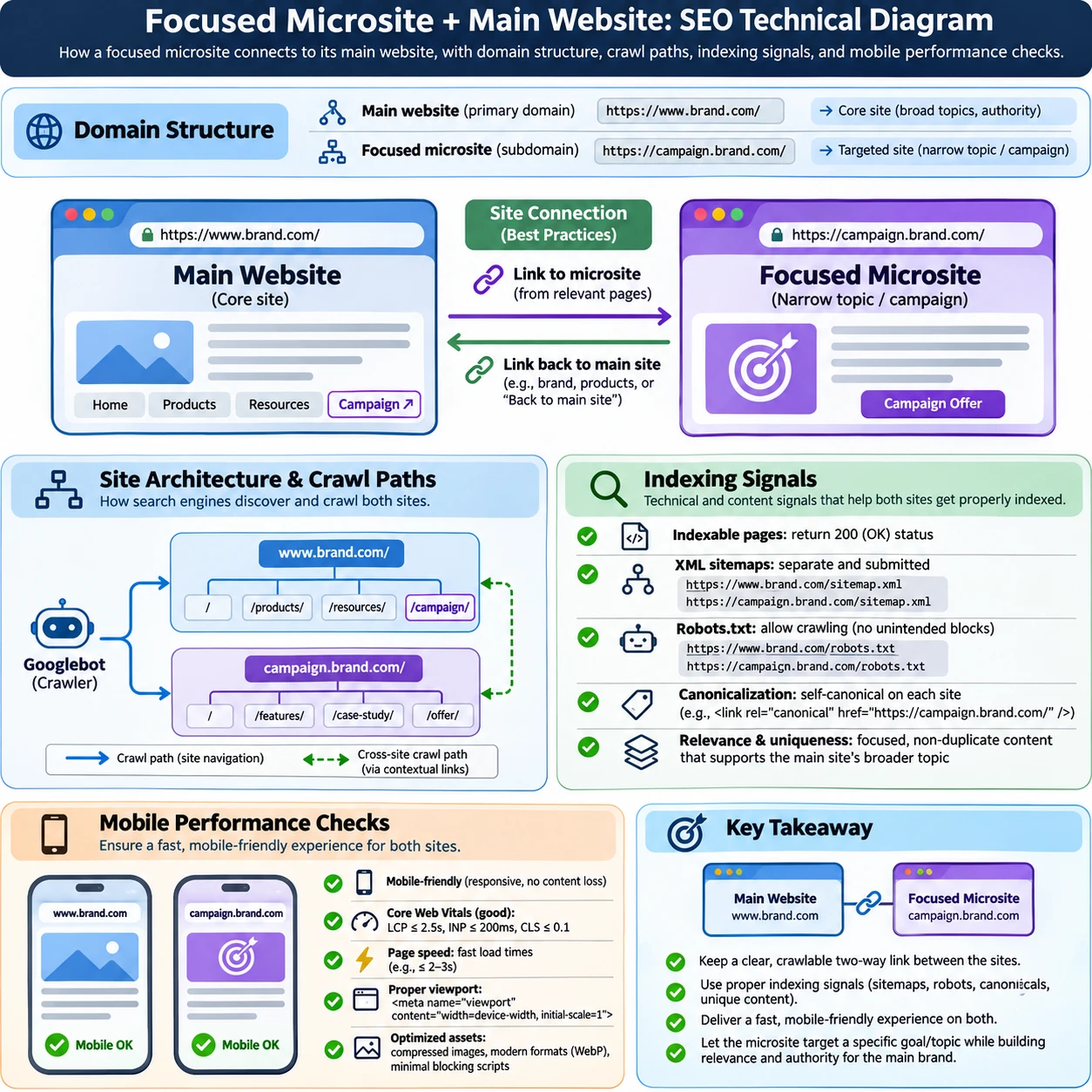
A microsite can support a campaign, product, event, or distinct audience, but a separate web address does not guarantee search visibility. Search engines still need to understand what the microsite is about, reach its pages, and decide which URLs belong in results.
Improving microsite SEO starts with a clear purpose and a hosting setup that supports crawlability, indexability, and reliable performance. The technical choices should also fit the relationship between the microsite and the main website; there is no single domain structure that works best for every organization.
Start with the microsite’s purpose and domain setup
A microsite’s purpose and domain setup should make its relationship to the main website clear to both visitors and search engines. Choose a separate domain or subdomain only when it supports a distinct, useful experience.
Begin by defining the audience, topic, and reason the microsite needs to exist. A focused site for a major event or a self-contained product may justify its own identity. A small set of campaign pages that closely supports the main website may fit better within its existing domain structure.
Each setup has trade-offs. A subdirectory, such as example.com/event, keeps content within the main domain’s structure and may simplify shared navigation and maintenance. A subdomain, such as event.example.com, can give a project technical or organizational separation, but it requires its own crawl and monitoring checks. A separate domain offers the strongest brand distinction and the greatest independence, while adding more work to establish, maintain, and connect it.
With microsite hosting, check that the chosen setup supports HTTPS, editable page metadata, redirects, and access to server or platform settings you need. Avoid creating multiple microsites that target the same audience and queries without a clear reason; they can split attention and make the organization’s content harder to understand.
Build a crawlable, logical site structure
A crawlable microsite uses clear navigation, concise URLs, and internal links that let people and search engines reach every important page. Keep the structure shallow enough that key content is not isolated.
Plan the URL architecture around the site’s real topics. Use readable paths such as /conference/speakers rather than long strings of dates, tracking codes, or unclear labels. Keep URL conventions consistent, including lowercase letters and a predictable trailing-slash policy. If you change a URL after launch, redirect the old address to the most relevant replacement.
Build a simple hierarchy: a home page points to primary sections, and each section links to its useful supporting pages. Add contextual internal links where they help visitors move between related information. A microsite may be small, but an attractive landing page cannot compensate for several useful pages that no link reaches.
- Make the primary navigation descriptive and usable on mobile screens.
- Link to important pages from the home page or a relevant section page.
- Use descriptive link text that explains what the destination contains.
- Check that navigation and page links use working, crawlable URLs.
Coordinate links with the main website where appropriate. A relevant link from the main site can help visitors discover the microsite, while the microsite can link back to useful main-site resources. These links should reflect a genuine relationship, not exist solely to manipulate rankings.
Check indexing signals and technical access
To help search engines index a microsite, make sure important pages are crawlable, allowed to be indexed, and represented by consistent sitemap and canonical signals. A page can be live in a browser but still be unavailable or unsuitable for search results.
Review the microsite’s robots.txt file and page-level directives. Robots.txt can guide crawlers away from areas they need not fetch, but it is not a reliable way to keep a URL out of search results. Use a noindex directive when a page should not appear in results, and ensure crawlers can access the page to read that instruction.
Create an XML sitemap containing the canonical URLs you want search engines to discover. Keep it current when pages are added, removed, or redirected. A separate microsite usually benefits from its own sitemap because it has a separate URL set; submit it through the relevant search engine webmaster tools and monitor reported issues.
Check canonical tags on representative pages. Each important page should normally identify the preferred URL for that content, using an absolute URL that matches the live protocol and hostname. Also verify that hosting preview URLs, staging environments, or default platform domains are not accidentally indexable. Search Console’s Google guidance on robots.txt explains the distinction between crawling and indexation controls.
Prevent duplicate and overlapping content
A microsite avoids search confusion when it offers a distinct purpose and original content, while genuine duplicate pages point to a clear preferred URL. The aim is to prevent competing versions, not to make every page different for its own sake.
Before publishing, compare the microsite’s proposed pages with the main website. If both sites target the same audience with near-identical product descriptions, FAQs, or campaign copy, decide which site should own that information. Where appropriate, link to the primary page instead of publishing another copy, or give the microsite a clearly different role, such as event registration, a specialized tool, or in-depth program details.
Canonical tags are useful when substantially similar or duplicate URLs need to remain accessible, but one version should be treated as preferred. They are signals, not a guaranteed command. Make sure internal links, sitemap entries, redirects, and canonical tags agree about the preferred URL. If content has moved permanently, a redirect is generally a clearer solution than leaving two live copies and relying on canonicalization.
Do not canonicalize distinct pages to the main website simply because they share a brand. That can tell search engines to disregard the microsite page even when it provides unique, valuable information. Review query overlap and page purpose periodically, especially after campaign content is added to the main site.
Optimize performance and mobile usability
A technically sound microsite loads reliably, works on mobile devices, and serves pages over HTTPS. These foundations improve the visitor experience and support search engines’ ability to assess and render the site.
Test key templates on a phone, not only the home page on a desktop. Make sure text is readable without zooming, buttons are easy to tap, and important content is available without interaction that blocks rendering. Search engines use mobile-first indexing, so the mobile version should contain the same essential content and metadata as the desktop version.
Measure page speed and Core Web Vitals with real-user data where available, then use lab tests to investigate problems. Large images, unnecessary scripts, and third-party campaign widgets often add weight. Compress images, load only the scripts the page needs, and use caching or a content delivery network when the hosting setup supports it. Improvements should target measured bottlenecks; adding a performance tool without testing its effect can create more overhead.
Confirm that every page uses HTTPS and that redirects send HTTP requests to the secure version. Ask the microsite hosting provider about cache controls, server response reliability, and how configuration changes affect redirects or rendering. A low-cost platform may reduce setup work, but limited control can make technical fixes harder, so check those capabilities before launch.
Measure results and maintain technical health
Maintain microsite SEO by checking search visibility, crawl and indexation reports, broken links, and performance on a regular schedule. Repeat key checks after publishing changes, changing hosting, or migrating URLs.
Set up the relevant search engine webmaster tools for the microsite’s domain or URL-prefix property. Track indexed pages, impressions, clicks, and queries alongside technical reports. A small site may have limited data at first; use the reports to spot issues rather than treating early fluctuations as proof that a strategy has succeeded or failed.
Use a practical maintenance cycle:
- After launch: test redirects, robots.txt, canonical tags, sitemap URLs, HTTPS, and mobile rendering.
- Monthly or after major updates: check index coverage, crawl errors, broken links, and sitemap status.
- After a hosting move: confirm DNS and certificates, preserve URL paths where possible, test server responses, and map old URLs to relevant destinations with redirects.
- Periodically: review content overlap with the main website and remove or update pages that no longer serve a clear purpose.
Keep a short change log with the date, affected URLs, and any redirect or indexing changes. It makes troubleshooting easier when a page disappears from results or a migration introduces unexpected errors. Technical SEO cannot guarantee rankings, but consistent checks reduce avoidable barriers to discovery.
Frequently asked questions about microsite SEO
The right answer depends on the microsite’s purpose, content, and hosting setup. These practical rules help resolve common domain and maintenance questions.
Should a microsite use its own domain or a subdomain?
Use the structure that best fits its brand and operational needs. A subdomain can separate a project while remaining connected to the organization; a separate domain creates more independence but adds setup and maintenance work. Neither option guarantees better rankings.
Does a microsite need its own XML sitemap?
A sitemap is useful when the microsite has several pages or needs independent monitoring. Include its preferred, indexable URLs and keep the file updated. For a very small site, a sitemap may help discovery, but it does not replace internal links or make a blocked page indexable.
How can a microsite avoid competing with its main website?
Give each site a distinct purpose and audience, assign topics to the most appropriate pages, and avoid publishing near-identical content on both. Use canonical tags or redirects only when they accurately reflect the preferred version.
What technical issues should be checked after moving microsite hosting?
Test DNS resolution, HTTPS certificates, server responses, redirects, robots.txt, canonical tags, sitemap URLs, and mobile rendering. Confirm that important URLs still work and that the new host has not exposed a staging version or blocked search crawlers.