Cost Analysis: Budget-Friendly vs. Enterprise Microsite Hosting
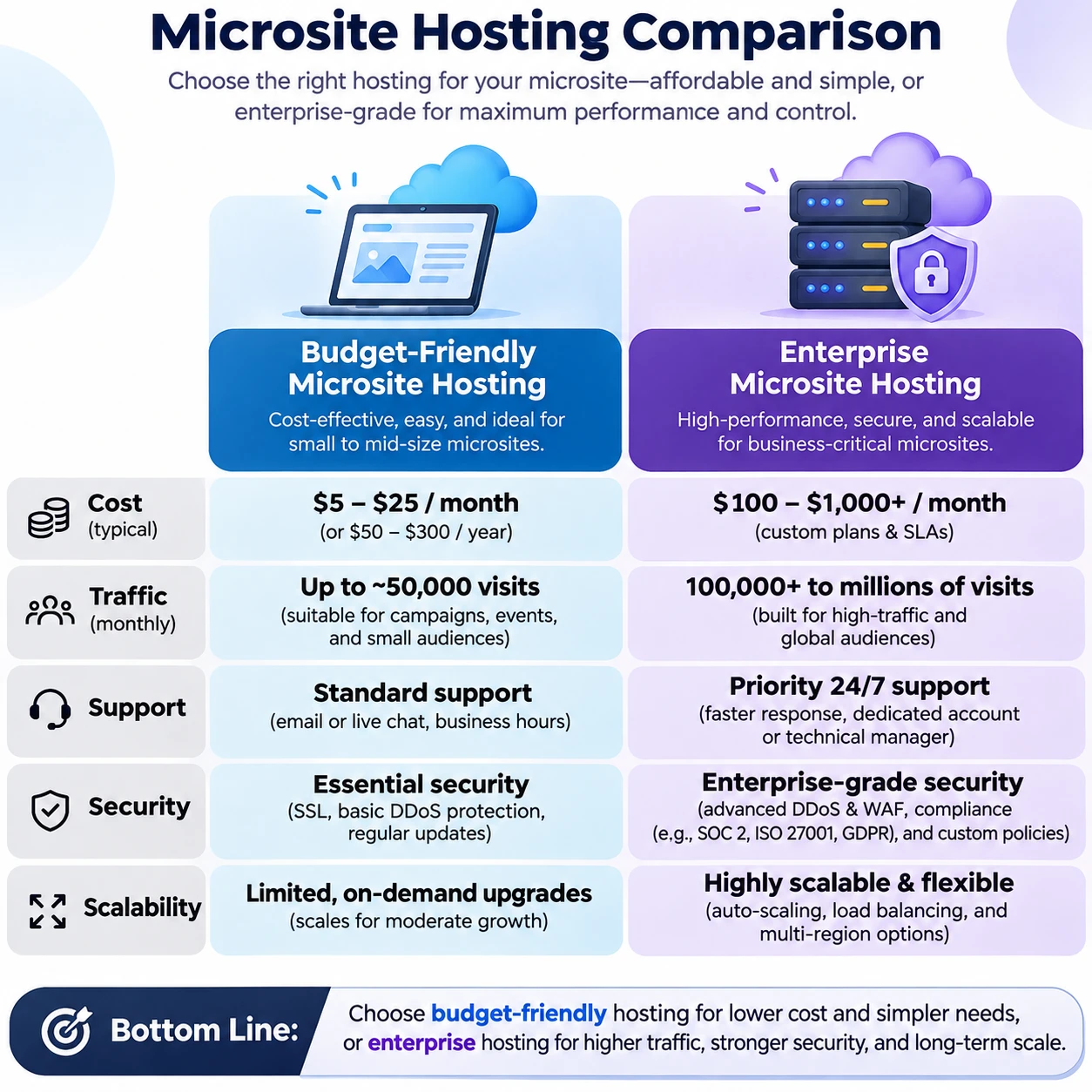
Choosing microsite hosting means balancing price against the demands of the campaign or experience you are building. A low monthly fee can suit a simple, low-risk launch, while enterprise hosting may be justified when uptime, security controls, support, or traffic capacity have direct business consequences.
The useful comparison is the total cost of ownership (TCO) over the time you expect to run the microsite, not the plan’s headline price alone. Features and limits vary by provider, so check what is included, what triggers extra charges, and what your team would need to manage.
What affects the cost of microsite hosting?
Microsite hosting costs depend mainly on expected traffic, storage, performance requirements, support, and security needs. The more your site must handle reliably or prove to auditors, the more likely it is to need paid capacity or specialist services.
Start with the site’s purpose. A short-lived event page with a few static pages has different requirements from a product launch microsite with video, interactive features, lead forms, and a large campaign audience. Traffic spikes matter as much as average traffic: a page promoted in a national campaign may receive most of its visits within a short window.
- Bandwidth and traffic limits: Plans may cap data transfer, requests, or visits. Overages, throttling, or a required upgrade can change the real cost.
- Storage and delivery: Large images, downloadable assets, and video can increase storage and bandwidth needs. A content delivery network (CDN) may be included or billed separately.
- Uptime and performance: Caching, load balancing, backups, and redundancy can support reliability, but availability commitments differ across plans.
- Security and compliance: SSL/TLS, access controls, malware monitoring, audit logs, data residency, and compliance support may be included, limited, or available as add-ons.
- People and operations: Setup, migration, maintenance, technical support, and incident response all have costs, even when they do not appear on the hosting invoice.
Pricing also reflects how much work the provider takes on. Managed services can reduce internal effort, while a less expensive self-service plan may require your team to configure updates, monitor performance, and troubleshoot problems.
What budget-friendly hosting typically includes
Budget-friendly microsite hosting typically provides the essentials for a relatively simple site at a lower starting cost. The exact package varies, so verify its resource limits, support channels, security features, and renewal terms before committing.
Depending on the provider, a lower-cost plan may include shared or pooled infrastructure, a basic control panel, SSL/TLS, standard backups, and support through a help center or ticket system. Some plans also offer managed updates, staging tools, or a CDN. None of these features should be assumed from the word “budget.”
This tier often works well for a small campaign, a regional event, a proof of concept, or a microsite that can tolerate brief maintenance windows. It can also be a sensible starting point when traffic is predictable and the organization has someone who can handle routine updates and basic troubleshooting.
The trade-off is usually less headroom or fewer guarantees. A plan may restrict bandwidth, concurrent requests, storage, or the number of environments. Support response times may not be guaranteed, and advanced security controls or compliance documentation may cost extra. Read the terms for overage rules and resource throttling, especially if a campaign could create sudden traffic.
A low-priced plan is not automatically poor value. It becomes a problem when its limits are invisible until launch, or when staff time spent managing gaps costs more than a higher-tier service would have.
What enterprise microsite hosting adds
Enterprise microsite hosting usually adds stronger operational controls, more support options, and clearer service commitments. Its value depends on whether those capabilities address real business, security, or reliability risks for your microsite.
Enterprise offerings may include dedicated or isolated resources, managed scaling, staging and deployment workflows, advanced monitoring, backup and recovery options, and tighter access controls. Some providers offer a named support contact, prioritized incident handling, or a service-level agreement (SLA) that defines availability targets and remedies. Features and SLA terms vary; an SLA is not a promise that outages cannot happen.
These capabilities can matter when a microsite supports a high-visibility product launch, a time-sensitive registration window, a regulated campaign, or a large paid-media push. If a failure could interrupt sales, prevent sign-ups, expose sensitive data, or create a compliance issue, faster response and documented controls may reduce exposure.
Enterprise hosting also brings trade-offs. It can cost more, involve onboarding or configuration work, and provide controls that a small team does not use. Compare what the provider commits to in writing with what your team actually needs. Ask whether the quoted price includes implementation, traffic capacity, support coverage, backups, security services, and any required integration work.
Compare total cost, not just the monthly price
To compare microsite hosting fairly, add the recurring plan fee to setup, upgrades, integrations, maintenance, and the expected cost of service disruption. This TCO view helps reveal whether a cheap plan stays economical once the site is live.
Build the estimate across the expected life of the microsite. Include one-time costs such as migration, design or platform configuration, DNS changes, and security review. Then add recurring expenses such as hosting, domain registration, premium support, monitoring, backups, CDN usage, and paid software or integrations.
Finally, account for variable and indirect costs. A campaign that exceeds bandwidth limits may incur overage charges or require a last-minute upgrade. A performance problem can also consume staff time and delay a launch. Downtime has no universal price: estimate its impact using the microsite’s role, such as missed registrations, interrupted sales, or wasted advertising spend, rather than assigning an unsupported industry-wide figure.
For a practical comparison, create two estimates for the same period, such as one year:
- Budget scenario: plan fees, likely add-ons, internal maintenance hours, and the cost of any capacity upgrade.
- Enterprise scenario: plan and onboarding fees, included services, any optional tools, and the staffing effort that remains with your team.
Use the same traffic assumptions for both. If one quote includes a CDN or managed backups and the other bills for them separately, list those items explicitly rather than treating the monthly prices as equivalent.
Which hosting tier fits your microsite?
The right hosting tier is the least costly option that meets the microsite’s traffic, risk, and operational requirements. Choose budget-friendly hosting for a contained, low-risk use case; consider enterprise hosting when stronger guarantees or controls protect meaningful business outcomes.
Use four filters before choosing:
- Purpose: Is the microsite informational, or does it support sales, sign-ups, payments, or a critical launch?
- Traffic: Estimate both normal visits and the largest plausible spike. Ask the provider how the plan handles bursts, not only monthly averages.
- Risk: Consider the effect of downtime, data exposure, or delayed incident response. Sensitive information and compliance obligations may require specific controls.
- Operations: Identify who will manage deployments, backups, monitoring, and support requests. A lower fee may require more internal expertise.
A small event microsite with static content, no sensitive data, and modest, predictable traffic may fit a budget plan. A product launch tied to paid advertising, a registration deadline, or a compliance review may warrant enterprise capabilities, particularly if the organization needs a documented SLA or a defined support path.
High traffic alone does not automatically require enterprise hosting. A well-configured lower-cost plan may handle a popular microsite if its capacity, caching, and scaling behavior are tested and sufficient. The key is to confirm limits before launch and have a credible upgrade or incident plan.
How to estimate your hosting budget
Estimate your microsite hosting budget by documenting requirements, comparing plan details, and adding likely costs over the full campaign period. Revisit the estimate before launch if traffic, data sensitivity, or the site’s business role changes.
Use this checklist when reviewing hosting plans and pricing:
- Set a realistic operating period, including setup, campaign dates, and any post-campaign archive.
- Estimate average traffic and peak demand; ask how bandwidth limits, overages, and traffic spikes are handled.
- List storage, backup, CDN, staging, and deployment needs, then mark which are included and which cost extra.
- Record uptime commitments, support hours, response targets, escalation procedures, and SLA exclusions.
- Check security features and any compliance, data location, access control, or audit requirements.
- Add setup, migration, integrations, maintenance time, renewal pricing, taxes, and cancellation terms.
- Ask what happens if the microsite outgrows the plan, and whether an upgrade can happen without a disruptive migration.
For a quick decision, score each requirement as essential, useful, or unnecessary. Pay for essentials first; retain useful features only when their benefit justifies the added cost. This prevents both underbuying critical protection and paying for enterprise controls that the microsite does not need.
Frequently asked questions
What costs should I include when comparing microsite hosting plans? Include the plan fee, setup and migration, bandwidth or storage overages, backups, CDN, security add-ons, integrations, support, maintenance time, and likely upgrades. Include the cost of disruption when downtime would affect a campaign or business process.
When is enterprise hosting worth the extra cost? It can be worth it when the site needs defined support response, stronger security controls, documented uptime commitments, predictable scaling, or help meeting compliance requirements. Confirm that the specific enterprise offer includes those capabilities in writing.
Can a budget plan handle a high-traffic microsite? It may, if its capacity and traffic management match demand. Test expected peaks, confirm bandwidth and request limits, and agree on what happens if the site approaches them. A high visit count by itself does not determine the right tier.
How can I avoid paying for hosting features I don’t need? Map each feature to a requirement, owner, and consequence if it is missing. Choose only the capabilities that support the microsite’s purpose, then review usage and renewal terms before extending the service.